What this checks
Checks the 16:9 thumbnail shape, recommended resolution, file type, upload size, safe-zone placement, and whether the image should stay readable in small mobile previews.
Check 16:9 thumbnail size, safe zone, edge text risk, file limits, and small-screen readability before upload.
Opens with YouTube thumbnail
Result
Add an image to see whether it is ready to upload.
Preview
Guidance area: keep important content inside the white frame when possible.
Small-screen readability: Tiny text and edge details lose impact in mobile feeds.
Mobile framing
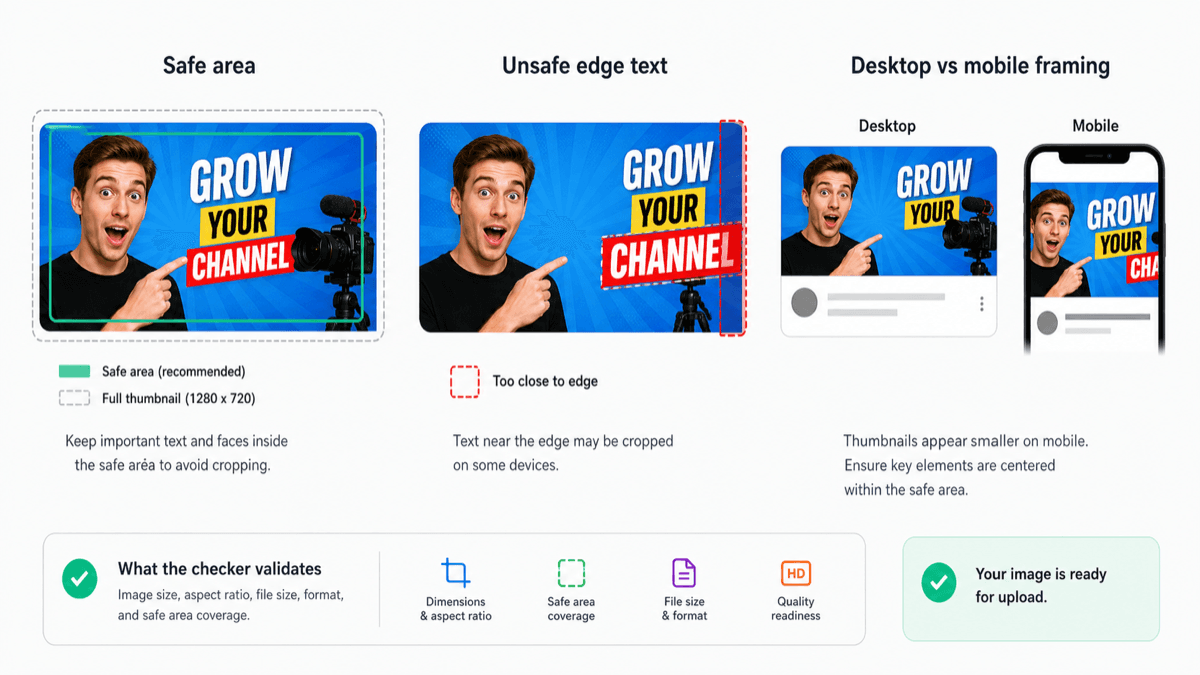
This is a static example. The checker above uses your actual image to show the personalized preview before upload.
Checks the 16:9 thumbnail shape, recommended resolution, file type, upload size, safe-zone placement, and whether the image should stay readable in small mobile previews.
YouTube thumbnails often fail by being too large, the wrong shape, or hard to read when they shrink in search, home, suggested video cards, or Shorts-related previews. Text near the edge is especially risky.
The preview shows a practical safe area and composition zone so faces, titles, and key objects stay visible after YouTube scales the thumbnail down. It is not an official YouTube boundary.
YouTube currently recommends 3840 x 2160. Mobile thumbnail uploads have a lower file-size limit than desktop uploads.