What this checks
Checks whether your LinkedIn banner or cover image has the right wide shape, enough resolution, a supported file type, a center-safe text area, and room for the profile-photo overlap.
Check desktop framing, mobile crop risk, profile-photo overlap, safe text placement, and upload readiness before you update your cover.
Opens with LinkedIn banner
Result
Add an image to see whether it is ready to upload.
Preview
Guidance area: keep important content inside the white frame when possible.
Mobile center crop: Keep names and logos near the center on mobile.
Mobile framing
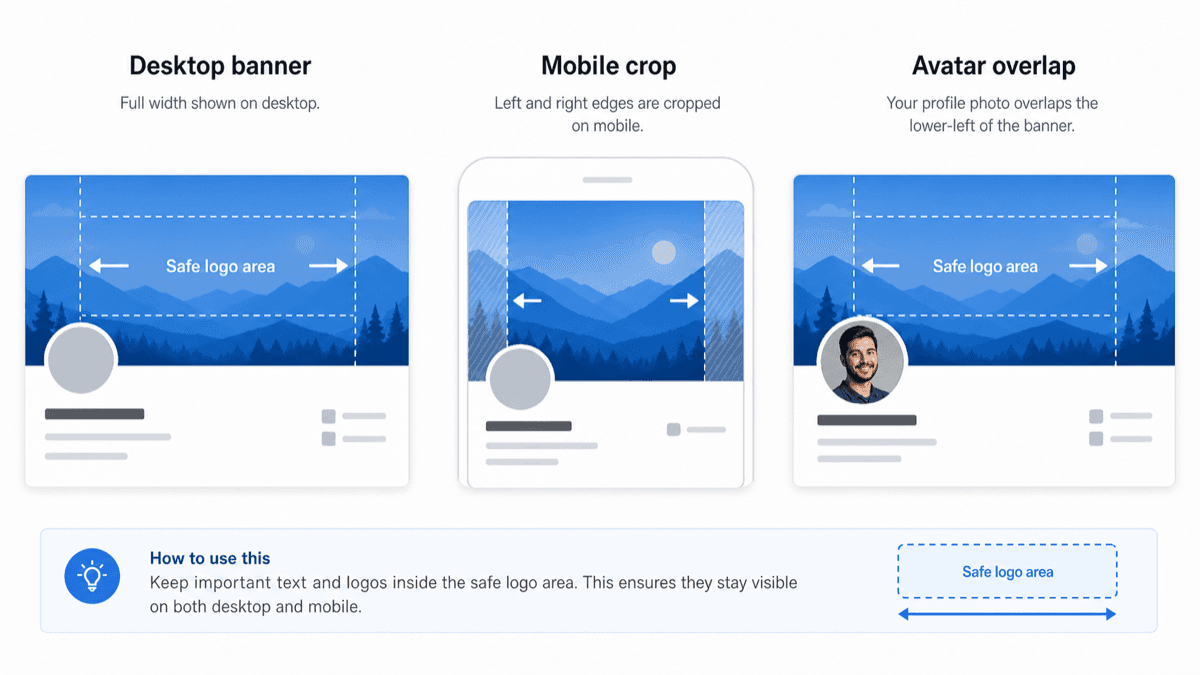
This is a static example. The checker above uses your actual image to show the personalized preview before upload.
Checks whether your LinkedIn banner or cover image has the right wide shape, enough resolution, a supported file type, a center-safe text area, and room for the profile-photo overlap.
LinkedIn banners and cover images can look fine on desktop but lose edge content on mobile. Text, logos, faces near the edges, and content near the avatar area are the most common risks.
Use the guidance preview to keep important content near the center and away from the profile-photo obstruction. The crop overlay approximates where side content may be trimmed on smaller screens.
This check helps you avoid obvious LinkedIn banner crop problems, but LinkedIn can still adjust display details across devices.