What this checks
Checks image dimensions, shape, file type, file size, and whether the product has enough room to remain clear in search and product pages.
Check the size, shape, file type, transparency, safe area, and mobile crop before you upload.
Opens with Amazon product image
Result
Add an image to see whether it is ready to upload.
Preview
Guidance area: keep important content inside the white frame when possible.
Search and zoom safe area: Leave margin while keeping the product large and centered.
Mobile framing
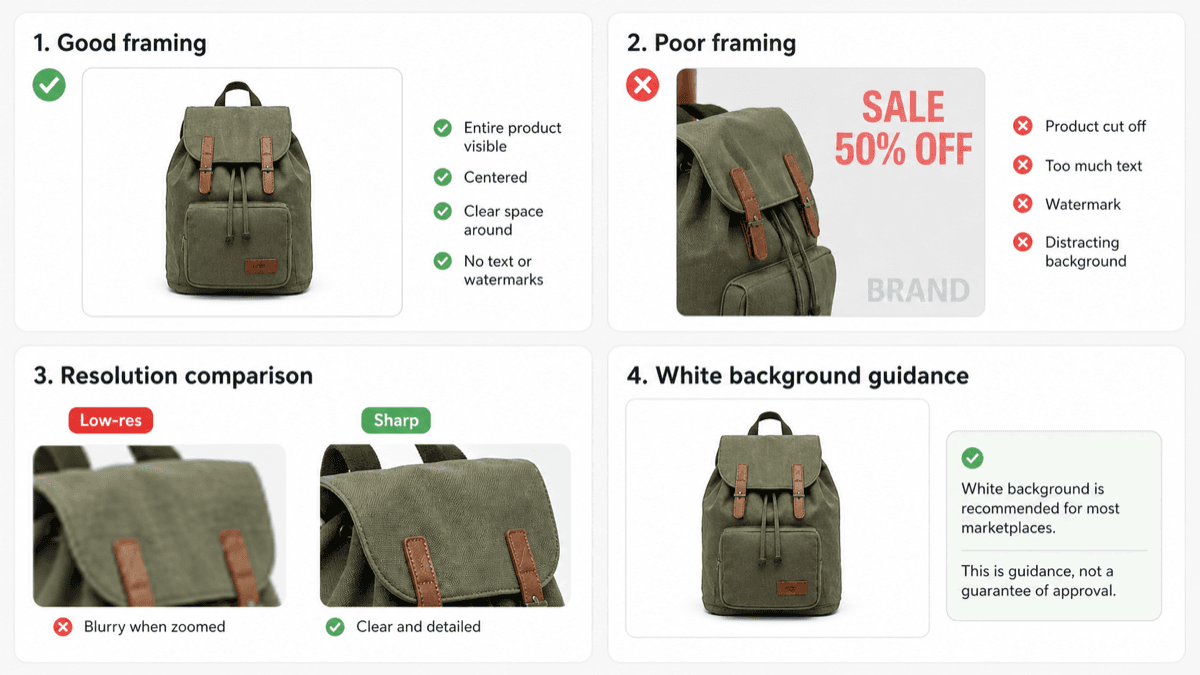
This is a static example. The checker above uses your actual image to show the personalized preview before upload.
Checks image dimensions, shape, file type, file size, and whether the product has enough room to remain clear in search and product pages.
Amazon may say the image provided is not valid when a file is unreadable, too small, poorly centered, exported in an unsupported format, or breaks main-image content rules.
The preview helps you see whether the product stays centered with enough margin. It also shows the area most likely to matter in thumbnails.
This browser check cannot detect every policy issue, such as extra text, watermarks, props, or whether a background is pure white.