Why LinkedIn banners crop
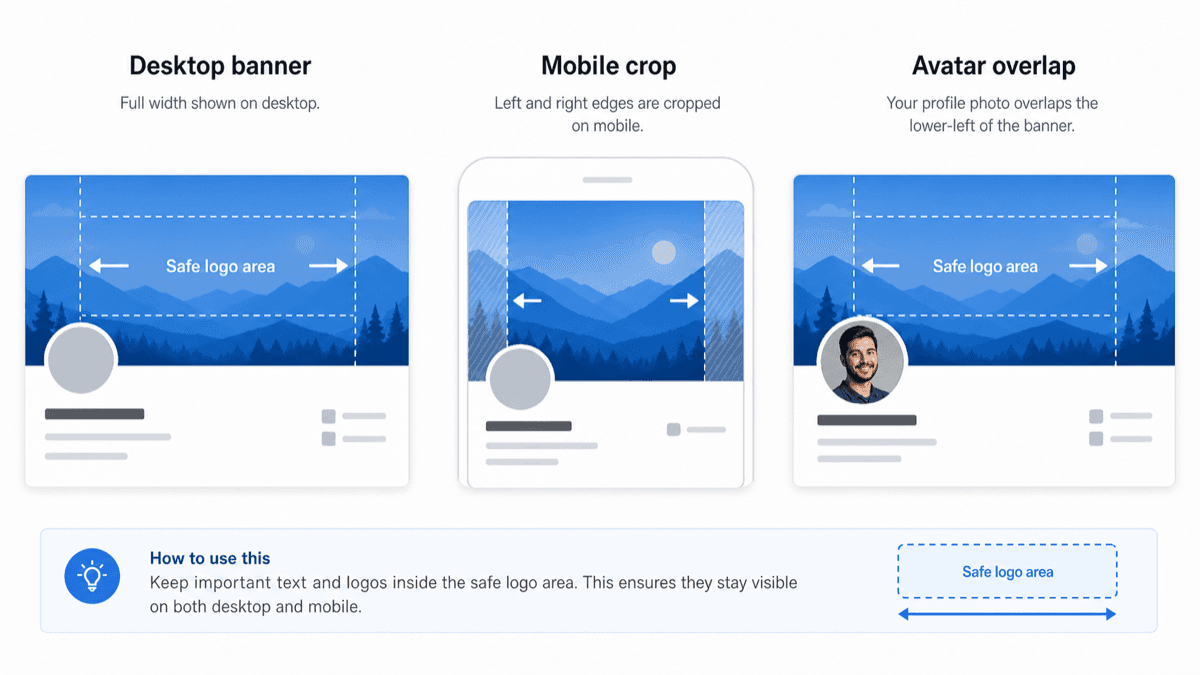
LinkedIn uses a very wide banner shape, then adapts it for different screens. A banner that looks balanced on desktop can lose side content on mobile, especially if text or logos sit near the edges.
Upload guidance
A quick guide to LinkedIn banner crop risk, mobile framing, and where to keep text or logos before you upload.
LinkedIn uses a very wide banner shape, then adapts it for different screens. A banner that looks balanced on desktop can lose side content on mobile, especially if text or logos sit near the edges.
Keep names, logos, faces, and important words near the center of the banner. Background texture can reach the edges, but anything the viewer must read should stay away from the left and right sides.
The LinkedIn banner checker shows the recommended shape, safe area, and mobile crop risk so you can see the likely problem before uploading.