ImageCompat

Upload guidance

Shopify product grid checker and image size guide

Check Shopify product image size, square framing, file type, product grid crop risk, and mobile collection previews before publishing.

Check your Shopify product grid imageImages never leave your device.

What this checks

  • Image size
  • Product framing
  • Quality risk
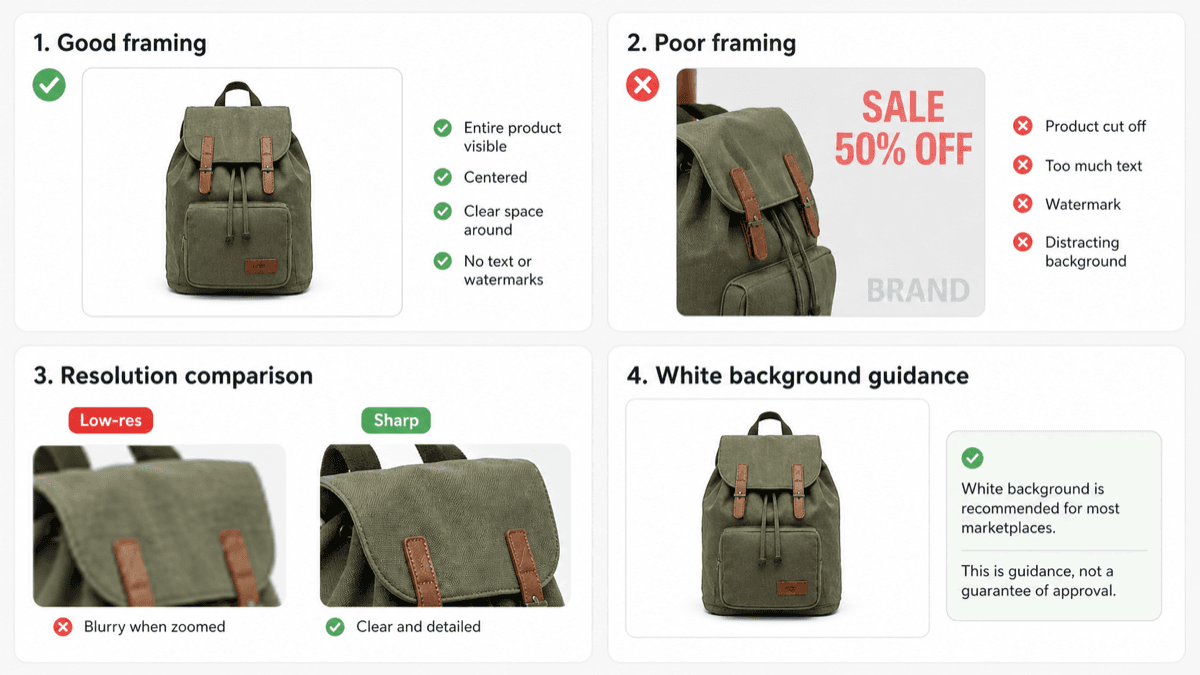
Marketplace product images are easier to trust when the product is centered, sharp, and not crowded by text.
Marketplace product image example showing good framing, poor framing, resolution comparison, and white background guidance.

Theme layouts change the crop

Shopify stores can display the same product image in galleries, product cards, collection pages, and mobile product grids. The theme decides how much space the image gets, so a product grid checker is most useful when it previews whether the product stays centered in smaller cards. If the same product photos also go to marketplaces, compare the Etsy listing image guide and Amazon image rejection guide.

Square is the safest starting point

Square product images usually work well across product cards, collection grids, and galleries. Consistent image shape also helps collection pages feel cleaner on mobile. Use the Shopify product image checker as a product grid checker to preview size, file type, mobile product grid framing, and collection-card crop risk before publishing.

What to check first

Look for enough resolution, a common file type, centered product placement, and enough edge margin so the image still works in product grids, collection cards, and smaller mobile cards. Shopify's product media docs are the source for current image limits and supported file types: Shopify product media types.